

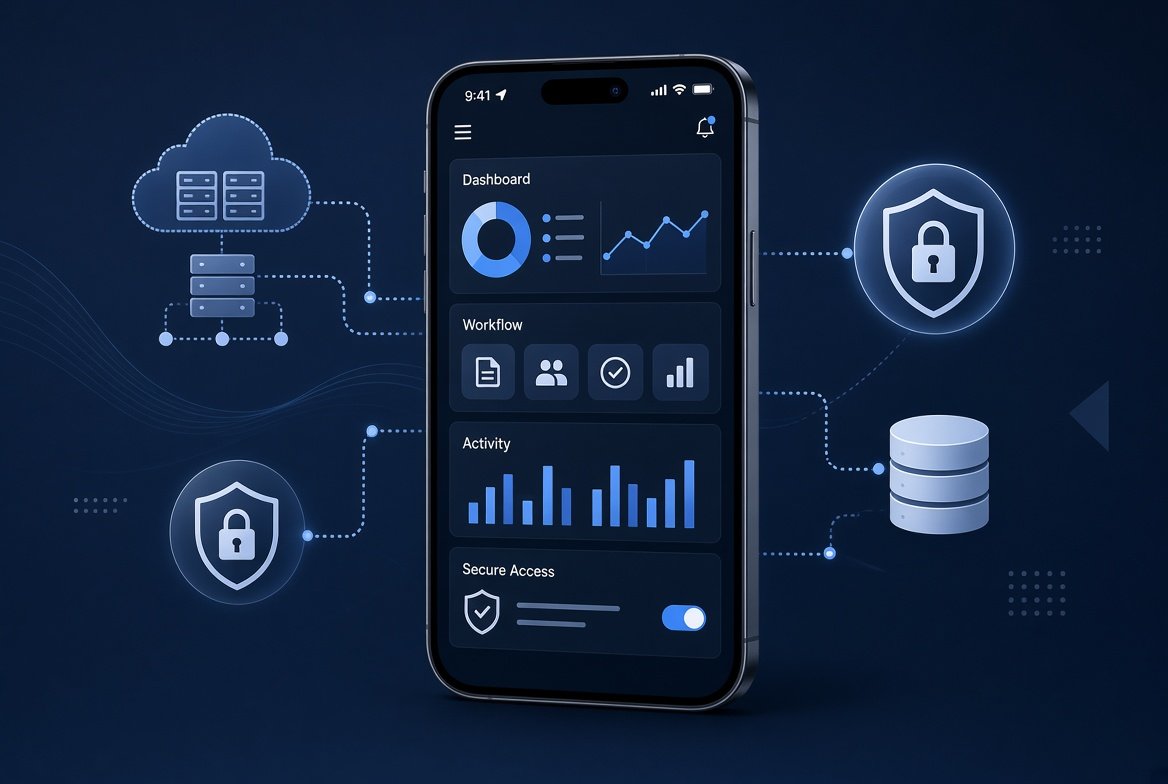
What Is Enterprise Mobile App Development?
Enterprise mobile app development is the process of designing, building, and maintaining mobile applications that support business operations, employees, partners, or customers. Unlike consumer apps, enterprise mobile applications typically require integration with systems such as CRM, ERP, HR, identity platforms, and internal APIs, along with stronger controls for authentication, data access, device management, and compliance.
Companies build enterprise mobile apps to replace paper, spreadsheet, and desktop-only workflows with secure mobile processes. Expense approvals can connect to ERP systems, inventory checks can pull data from warehouse systems, and field workers can continue recording inspections when connectivity is limited. The business case is rarely “we need an app”; it is usually a specific workflow that is slow, error-prone, or difficult to manage outside the office.
Enterprise mobile adoption is also being shaped by BYOD, device management, cloud integration, and growing security requirements. Mordor Intelligence estimates the enterprise mobile application development market at $189.22 billion in 2026, with the market projected to reach $338.42 billion by 2031. These figures are market estimates rather than official industry totals, but they illustrate the growing commercial focus on enterprise mobility. Whether a company builds in-house or hires an enterprise mobile app development company, the underlying challenge remains the same: connecting mobile workflows with enterprise systems while maintaining appropriate security, identity, and governance controls.
Table of Contents
Types of Enterprise Mobile Applications
Enterprise mobile apps fall into several broad categories based on their purpose and audience. Each type implies different integration and feature needs. A common classification is:
| App Category | Example Applications | Typical Integrations |
|---|---|---|
| Employee-level (Internal) | Team chat (e.g. Slack), timesheets, expense reporting, on-site tools | HRIS, Active Directory/SSO, intranet |
| Departmental | Sales enablement apps, field service mobile apps, warehouse inventory | CRM (Salesforce, Dynamics), ERP, inventory systems |
| Company-wide | Corporate directory, help desk ticketing, policy or news portal | Directory services (AD/LDAP), ServiceNow, internal portals |
| Customer-facing (B2B) | Partner portals, account management apps | CRM, billing systems, partner APIs |
Each category carries different integration and feature priorities. Employee-level apps emphasize SSO and HRIS connectivity. Departmental field or sales apps almost always require offline-first design and tight CRM/ERP links. Company-wide tools lean on directory services. B2B portals prioritize partner APIs and billing systems. Match the category to the workflow first; the technology choice follows.
Development Platforms and Technologies
Modern enterprise apps are commonly built using several development approaches:
- Native development on iOS with Swift and Android with Kotlin provides the strongest access to platform-specific APIs, device capabilities, and performance optimizations. Java and Objective-C remain important for maintaining existing applications, but Swift and Kotlin are the primary choices for many new native projects. Google describes Android as Kotlin-first and recommends starting new Android development with Kotlin..
- Cross-platform frameworks such as React Native, Flutter, and .NET MAUI allow teams to share code across iOS and Android. They can reduce duplicated development and maintenance work, although platform-specific features may still require native code or additional integration.
- Hybrid apps built with web technologies such as HTML, CSS, and JavaScript inside a native container can reduce development effort for some applications. Performance, user experience, and device access depend on the framework and implementation.
- Progressive Web Apps (PWAs) are web applications that can provide features such as offline capabilities and home-screen installation. They can often be distributed without traditional app-store installation, but device capabilities remain more limited than in fully native applications and depend on browser and operating-system support.
- Low-code/no-code platforms such as Microsoft Power Apps, OutSystems, and Mendix provide visual development tools and prebuilt components. They can accelerate simpler internal applications, but highly customized requirements may still require traditional development and can increase dependence on the platform vendor.
Note: Xamarin should not be selected for new projects. Microsoft ended support for Xamarin and Xamarin.Forms on May 1, 2024 and recommends moving Xamarin.Forms applications to .NET MAUI.
Each approach has trade-offs. The table below summarizes key factors:
| Development Approach | Pros (Advantages) | Cons (Limitations) |
|---|---|---|
| Native (iOS/Android) | Maximum platform integration; full device API access; strong performance | Separate development effort for each platform |
| Cross-Platform (React Native, Flutter, .NET MAUI) | Shared codebase; reduced duplication; faster multi-platform development | Platform-specific features may require native code |
| Hybrid (Ionic/Cordova) | Uses web development skills; useful for some lightweight applications | Device capabilities and performance depend on framework and implementation |
| Progressive Web App (PWA) | Easy distribution; web-based deployment; installable on supported platforms | More limited device integration; browser and OS dependent |
| Low-Code/No-Code | Rapid development; useful for simpler internal workflows | Less flexibility for complex requirements; platform dependency |
Platform choice is driven by performance needs, team skills, and timeline. For projects targeting both iOS and Android, cross-platform frameworks such as React Native and Flutter can reduce duplicated development work. Native development remains preferable when an application requires maximum platform-specific performance, specialized hardware access, or deep operating-system integration.
Architecture and Back-End Integration
Enterprise mobile apps consist of a mobile front-end (UI, local caching, offline storage) and back-end services that expose data and business logic through APIs. A solid architecture typically includes:
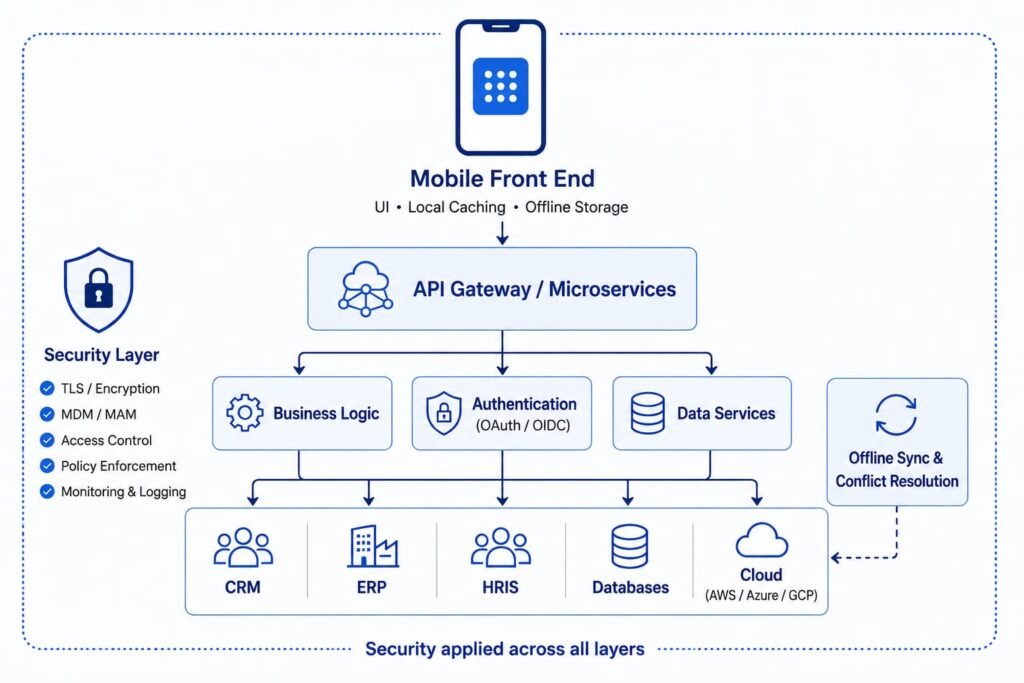
- An API gateway or microservices layer that connects the app to enterprise systems such as ERP, CRM, and HRIS. For organizations using NetSuite, understanding the underlying ERP implementation requirements is also important before designing the mobile integration layer.
Backend-for-frontend (BFF) or API mediation, where appropriate, to expose mobile-specific APIs rather than allowing the mobile client to interact directly with every internal enterprise service. This can simplify authentication, reduce unnecessary data exposure, and give teams greater control over mobile-specific payloads and business rules.- Cloud or hybrid deployment (AWS, Azure, GCP) for scalability, with sensitive systems remaining on-premises when required
- Offline-first design with local storage (e.g. SQLite) and conflict-resolution logic for field and manufacturing use cases
- Security built into every layer: TLS, token-based authentication (OAuth/OIDC), encryption at rest, and MDM/MAM policy enforcement
Prioritize modularity and standard patterns (Clean Architecture or MVVM). Design for scalability, high availability, and compliance requirements before writing the first screen. Architecture decisions made early prevent expensive rework later.
Enterprise Mobile App Development Checklist
Before development begins, enterprise teams should confirm seven areas:
- Business workflow: Define the process the app is intended to improve and the users responsible for it.
- System integration: Identify the CRM, ERP, HR, identity, payment, or other backend systems the app must connect to.
- Identity and access: Decide how SSO, MFA, roles, permissions, and device authentication will work.
- Device strategy: Determine whether employees will use company-owned devices, BYOD, or both, and select the appropriate MDM or MAM approach.
- Offline requirements: Identify which workflows must continue when users have limited or no connectivity.
- Security and compliance: Map sensitive data, encryption requirements, logging, privacy obligations, and security testing before development starts.
- Success metrics: Define measurable outcomes such as task completion time, adoption, approval speed, error reduction, or hours saved.
The most important rule is to design the enterprise operating model before choosing the mobile technology. A technically strong app can still fail if its workflow, integrations, ownership, or security requirements were poorly defined.
Security and Compliance
Enterprise mobile applications often handle employee records, customer information, financial data, credentials, and access to internal systems. A security failure can therefore expose sensitive information or provide a path into broader enterprise infrastructure. Security should be treated as an architectural requirement from the beginning rather than a feature added near launch.
Key security considerations include:
- Mobile device security: NIST SP 800-124 Rev. 2 provides guidance for managing and securing enterprise mobile devices, including both organization-owned and personally owned devices. It covers centralized device management, endpoint protection, secure deployment, use, and disposal across the mobile-device lifecycle.
- Device and App Management: Determine if devices are company-owned or BYOD. For company-owned devices, MDM can enforce device policies, manage applications, and control configuration. For BYOD environments, MAM can apply application-level policies and help protect business data without requiring the same level of control over the entire personal device.
- Encryption: Protect sensitive data both at rest and in transit using current, industry-accepted cryptographic standards. Secure local databases, protect encryption keys using platform-supported secure storage, and configure transport security according to current platform and organizational requirements.
- OWASP Guidelines: Use the OWASP Mobile Application Security Verification Standard (MASVS) as a security-control baseline and the Mobile Application Security Testing Guide (MASTG) for technical testing guidance. MASTG 2.0.0 was released in July 2026 as the stable, non-beta version of the refactored testing guide.
- Compliance: Be aware of legal requirements For instance, GDPR/CCPA for user data, HIPAA for health information, or PCI-DSS for payment data. These frameworks and laws impose different requirements around personal data, privacy rights, security controls, consent, access, and auditability depending on the industry and type of information handled.
- Additional Controls: Common practices include certificate pinning, tamper detection, runtime application self-protection (RASP), and app vetting. Enterprise apps should go through independent penetration testing before launch.
Generative AI has also become a mobile security consideration. Verizon’s 2025 Mobile Security Index reports that 93% of employees use generative AI tools on mobile devices to assist with daily workflows, while 64% of organizations cite data compromise from employees entering sensitive or proprietary information into generative AI as a top mobile-device risk.
A practical starting point is to map the mobile app’s data flows and trust boundaries: what data enters the device, where it is stored, which APIs it can access, what happens when the device is lost, and which enterprise systems can be reached from the app. This makes security requirements much easier to translate into technical controls and testing.
For enterprise mobile applications, this reinforces the need for controls around data sharing, approved applications, identity, and device management. Depending on the environment, organizations may use MDM/MAM policies, DLP controls, application allow lists, and restrictions on copying sensitive information into unapproved applications. Security requirements should be defined during architecture and threat modeling rather than added after development.
Development Process and Best Practices
A disciplined enterprise mobile development process typically moves through seven stages:
- Discovery and strategy: Define the workflow, users, device ownership model, identity requirements, integrations, and compliance obligations.
- UI/UX design: Design around the actual mobile workflow, including accessibility, small screens, intermittent connectivity, and field conditions where relevant.
- Backend and architecture: Define APIs, authentication flows, data models, offline synchronization, and integration boundaries before application development is too far advanced.
- Secure development: Build iteratively with code review, dependency management, secure credential handling, and security requirements integrated into the development lifecycle.
- Testing: Test across supported devices and operating systems, including functional, performance, offline, integration, and security testing.
- Controlled deployment: Use appropriate enterprise distribution, MDM/MAM controls, staged releases, and rollback procedures.
- Operations and maintenance: Monitor application health, adoption, crashes, security issues, and integration failures while maintaining a regular patch and release cycle.
IT, security, legal, and business owners should be involved early. Document data flows and API contracts because enterprise applications often remain in production long after the original development team has changed.
Why Most Enterprise Mobile App Projects Actually Fail
Enterprise mobile projects rarely fail because developers cannot build the application. They more often struggle because workflow, integration, device-management, or ownership decisions were made too late. Enterprise mobile projects commonly run into three predictable problems, particularly when architecture, integration, and ownership decisions are made too late:
- The MDM/MAM decision gets made too late. Teams build the app first and figure out device management after, then discover the app architecture doesn’t support the enrollment model IT actually needs.
- Legacy system integration is scoped as an afterthought. Connecting the mobile application to existing ERP, CRM, HR, identity, or other enterprise systems can become one of the largest sources of complexity if APIs, data models, authentication, and integration dependencies are not assessed during discovery.
- No single stakeholder owns the requirements. HR, IT, and the business unit each assume someone else is defining “done,” and the app ships solving the wrong version of the problem.
The fix isn’t more QA, it’s sequencing. Lock MDM/MAM strategy, realistic legacy integration scope, and clear requirement ownership before design begins. Projects that reverse this order reliably run late, over budget, or solve the wrong problem.
Costs, Vendors, and ROI
Enterprise mobile app development costs vary significantly based on the number of platforms, integrations, security requirements, offline capabilities, compliance obligations, and long-term support needs. A relatively simple internal application may require far less investment than a multiplatform system connected to ERP, CRM, identity, and other enterprise platforms. The most useful way to estimate cost is to break the project into discovery, design, development, integration, security testing, deployment, and ongoing maintenance rather than relying on a single industry-wide price range.
Choosing an Enterprise Mobile App Development Company
Selecting an enterprise mobile app development company should be based on its ability to handle the complete delivery environment, not just mobile development. Look for partners that have worked with the same categories of enterprise systems, identity platforms, device-management models, and security requirements your organization uses.
Key evaluation criteria:
- Proven experience with MDM/MAM strategies and enterprise identity (Azure AD, Okta, Ping)
- Documented security and compliance work (SOC 2, ISO 27001, HIPAA, or GDPR as relevant)
- Clear ownership of source code, documentation, and knowledge transfer after launch
- Case studies that show realistic timelines and post-launch support, not just logos
Ask every shortlisted firm how they handle the three most common failure points: late MDM/MAM decisions, under-scoped legacy integration, and unclear requirement ownership. The companies that surface these issues early are usually the ones worth hiring.
When to Use Enterprise Application Development Services
Choose external enterprise application development services when you have a single, well-scoped project with a hard deadline or when your internal team lacks deep mobile + enterprise integration experience. An outside provider can be a practical choice for a one-off project, a hard deadline, or a team that lacks specialist mobile and enterprise-integration experience. However, the organization should still retain ownership of architecture decisions, requirements, security expectations, source code, and operational knowledge.
Build in-house (or expand an internal team) only if you plan to create and maintain multiple internal apps over several years. In that case, the long-term cost of knowledge retention and faster iteration can outweigh the higher upfront cost of external services.
Most organizations start with a specialized partner for the first complex app, then decide whether to bring subsequent work inside based on volume and strategic importance.
Return on investment comes from measurable process gains: reduced manual work, fewer errors, faster approvals, and higher field productivity. Track adoption rate, task completion time, and hours saved per user in the first 90 days after launch. These metrics, not vanity downloads, determine whether the investment paid off.
Current Trends and Future Outlook
Current Trends and Future Outlook
Several trends are changing how organizations approach enterprise mobile app development:
- AI-assisted mobile experiences: Enterprise apps increasingly use AI for search, summarization, workflow assistance, and employee productivity. These features introduce additional requirements for data access, model governance, permissions, and auditability.
- AI-assisted development: Development teams are using AI coding and testing tools to accelerate parts of the software lifecycle. Organizations still need code review, dependency controls, security testing, and clear policies for handling proprietary code and data.
- Edge and IoT integration: Field service, logistics, manufacturing, and asset-management applications increasingly connect mobile workflows with sensors, connected equipment, and edge systems.
- Offline-first applications: Mobile workers often operate in warehouses, construction sites, remote facilities, or areas with unreliable connectivity. Offline synchronization and conflict handling therefore remain important architectural requirements.
- Low-code and composable development: Low-code platforms can accelerate internal applications and workflow automation, particularly when the requirements fit the platform’s capabilities. Complex integrations and highly customized applications may still require conventional development.
- Stronger mobile security controls: As mobile devices become a gateway to enterprise systems and employees increasingly use AI tools on mobile devices, organizations need tighter controls around identity, data access, application management, and device security.
The strongest long-term approach is not to build around a single trend. Instead, use modular architecture, well-defined APIs, centralized identity, and clear data boundaries so new capabilities can be introduced without redesigning the entire application.
Final Thoughts
Enterprise mobile app development is less about choosing a framework and more about connecting a mobile experience to the systems, workflows, and security controls a business already depends on.
The right approach starts with the business process, then defines integrations, identity, device management, offline requirements, security, and success metrics before development begins. For organizations without the required expertise in mobile and enterprise integration, working with an experienced enterprise mobile app development company or enterprise application development services provider can reduce implementation risk.
The goal is simple: build an app that makes a measurable business process faster, safer, or easier, not another piece of software employees are expected to use.
FAQ
What is enterprise mobile app development?
Enterprise mobile app development is the process of designing, building, deploying, and maintaining mobile applications that support business workflows for employees, partners, or customers while integrating with enterprise systems and security controls.
How is it different from consumer app development?
It prioritizes SSO, MDM/MAM, role-based access, offline sync, and compliance over broad consumer appeal.
What are the main types of enterprise apps?
Employee self-service, departmental (sales/field), company-wide (directory/help desk), and B2B partner or customer portals.
How much does an enterprise mobile app cost?
Costs vary based on platforms, integrations, security, offline functionality, compliance requirements, and ongoing support. A simple internal app can cost much less than a multi-system enterprise application, so estimates should be based on project scope rather than a fixed industry-wide price.
Which development approach should I use?
Cross-platform frameworks such as React Native or Flutter are often a good fit for teams targeting both iOS and Android; native development is preferable when deep platform integration or specialized device capabilities are critical; low-code can work well for simpler internal tools.
Is Xamarin still supported for enterprise mobile app development?
No. Microsoft ended support for Xamarin and Xamarin.Forms on May 1, 2024. New .NET cross-platform projects should use .NET MAUI, while existing Xamarin applications should be evaluated for migration.
What security measures are non-negotiable?
Strong encryption, secure authentication and authorization, appropriate MDM or MAM controls, protected credential storage, logging, and security testing. The exact controls depend on the app’s data, devices, integrations, and compliance requirements.
Should I build in-house or hire an enterprise mobile app development company?
In-house if you will maintain multiple apps long-term; an external enterprise application development services provider is usually faster for a single scoped project.
What should companies consider before starting enterprise mobile app development?
Companies should define the business workflow, target users, backend integrations, identity and access requirements, device-management strategy, offline needs, security obligations, and success metrics before choosing a development approach.
References
- Mordor Intelligence, Enterprise Mobile Application Development Market – Growth, Trends, and Forecasts (2026–2031).
- NIST, Special Publication 800-124 Revision 2: Guidelines for Managing the Security of Mobile Devices in the Enterprise.
- Google Android Developers, Android’s Kotlin-first approach.
- Microsoft, Xamarin Support Policy.
- Microsoft, .NET MAUI and Xamarin migration documentation.
- OWASP, Mobile Application Security Verification Standard (MASVS).
- OWASP, Mobile Application Security Testing Guide (MASTG).
- Verizon, 2025 Mobile Security Index.
- AWS, Mobile Application Development overview.