
Server-Based Computing: What It Is and How It Works
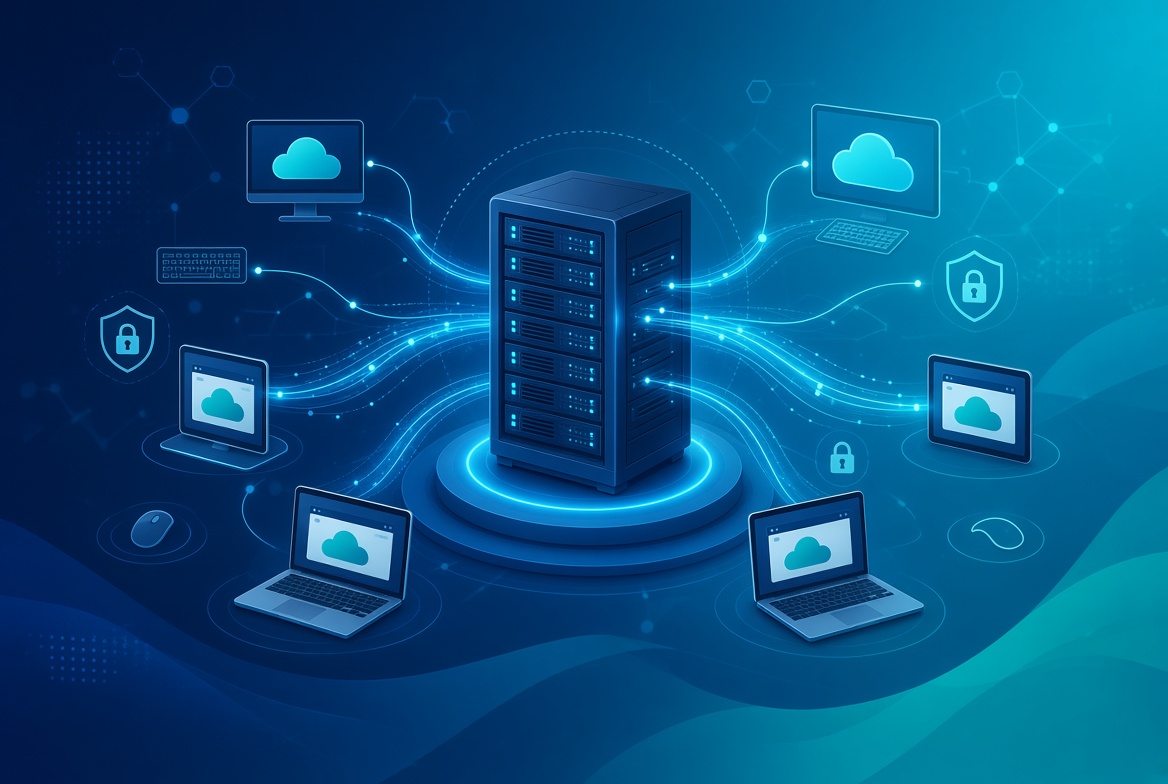
Server-based computing is an architecture where applications, data, and most processing run on a central server instead of the user’s own device. The endpoint mainly displays the remote session and sends keyboard, mouse, or touch input back to the server, although some local processing may still be required for display rendering, peripherals, security software, or client features.
It shows up more than most people realize: a hospital worker pulling up patient records on a shared workstation, a call center agent logged into a scripted CRM tool, a contractor accessing a company’s finance system from a personal laptop. IT teams often choose it because applications can be updated centrally, users can access the same managed environment from different devices, and sensitive data can remain within controlled server-side systems. The exact security and management benefits depend on the deployment design and access controls. Server-based computing is one part of broader IT infrastructure management, which also includes servers, networks, endpoints, monitoring, security, and operational maintenance.
This guide covers how server-based computing actually works, how it differs from VDI and cloud computing, where it’s used today, where it falls short, and, since it’s the question most glossary pages skip, how much bandwidth it actually needs.
Table of Contents
Session-Based Computing and Personal Desktops
Not all server-based computing works the same way, and this is the detail most explainers skip past. In a session-based deployment, many users share one instance of a server operating system at once — the model behind Microsoft’s Remote Desktop Session Host and Citrix Virtual Apps In a personal or virtual-desktop deployment, each user instead gets a dedicated virtual machine with its own OS copy, which is what most people actually mean when they say VDI. Vendors increasingly bundle both under one console, but the underlying split — one shared OS versus many dedicated ones — is still the technical line between them, and it’s what actually determines cost, density, and how much a user can personalize their environment.
How Server-Based Computing Works
The Client Side
The device in front of the user can be a thin client (minimal local storage), a zero client (even less hardware, sometimes no local OS at all), or an ordinary PC just running client software to reach the session. The endpoint’s main job is to display the remote session and relay user input, althoug it may also handle local display rendering, peripheral processing, security software, and client-side features. Because relatively little application processing and data storage happen locally, thin clients can be easier to replace and manage. They may also reduce the amount of sensitive data stored on endpoints, although they still require secure configuration, patching, authentication, and endpoint protection.
The Server Side
On the other end, one or more session host servers perform the main application and desktop processing. In a Windows environment, this role typically falls to a Remote Desktop Session Host. Microsoft’s Remote Desktop Services overview explains how Windows Server delivers centralized desktops and applications through roles such as Remote Desktop Session Host, Connection Broker, Gateway, and Licensing. Users connect through Remote Desktop clients on Windows, macOS, iOS, Android, and other supported platforms. A session host may support many concurrent users, but the practical number depends on CPU and memory capacity, application behavior, graphics requirements, storage performance, user density, and licensing.
The Protocol in Between
Remote display technologies such as Microsoft RDP, Citrix ICA/HDX, and Omnissa Blast Extreme carry screen updates to the endpoint and send keyboard, mouse, or touch input back to the host. They are designed to use network resources efficiently, but the actual experience depends on latency, packet loss, available bandwidth, endpoint hardware, graphics requirements, and application behavior. Microsoft’s Remote Desktop Services documentation provides additional information about remote desktop access, publishing options, deployment models, and RDP-based connections.
How Much Bandwidth Does Server-Based Computing Need?
Bandwidth requirements vary considerably by workload. A text-based published application may use far less bandwidth than a full graphical desktop with video, animation, multiple monitors, or frequent screen changes. Vendor guidance can provide a starting point, but it should not be treated as a universal requirement.
For planning purposes, organizations should measure real sessions under realistic conditions, including normal office applications, file transfers, multimedia, video calls, multi-monitor use, and remote connections. Bandwidth is only one factor: latency, packet loss, jitter, server capacity, and user density can have an equally important effect on responsiveness.
A pilot should therefore measure actual traffic per user and test peak concurrent usage before setting a final network capacity target.
Session-Based Computing vs. VDI: The Main Difference
Server-based computing is a broad category, but two common approaches are session-based computing and virtual desktop infrastructure (VDI). In a session-based deployment, multiple users share one server operating system while working in separate sessions. In a VDI deployment, each user receives a separate virtual machine with its own operating system environment. The distinction affects application compatibility, resource usage, personalization, isolation, and management effort.
| Attribute | Session-Based Computing | Traditional VDI |
|---|---|---|
| Operating environment | Multiple users share one server OS in separate sessions | Each user receives a separate virtual machine |
| Resource density | Usually higher because users share one OS | Usually lower because each VM requires additional resources |
| Personalization | Often limited by application and profile policies | Usually greater |
| Application compatibility | Some applications may not support multi-user server environments | Often broader, depending on the guest OS and application |
| Isolation | Users share the same server OS and underlying host resources | Greater separation between user desktops, although the platform still has shared dependencies |
| Management | Fewer OS images may be required | More desktop images and virtual machines may need management |
| Best fit | Task workers, published applications, and standardized workflows | Power users, specialized applications, and personal desktop environments |
| Network requirements | Depend on the applications and session activity | Depend on the desktop workload, graphics, peripherals, and user behavior |
The split isn’t even universally agreed on. Some longtime IT practitioners treat VDI as simply a newer branch of server-based computing rather than a separate category — it’s still a desktop running on a server, just with its own virtual machine underneath instead of a shared one.
Server-Based Computing vs. Cloud Computing and DaaS
Server-based computing describes where application processing takes place. Cloud computing describes a broader way of delivering computing resources through on-demand, network-accessible services. An organization can run server-based computing on infrastructure it owns, in a private cloud, or through a public-cloud provider. Desktop as a service (DaaS) is a managed cloud-delivered desktop model, although the exact architecture may use session-based computing, VDI, or a combination of both. For a cloud-hosted example, Azure Virtual Desktop supports both multi-session and single-session desktop and application delivery, showing how cloud services can combine different virtualization models.
“Examples of cloud-hosted desktop and application services include Amazon WorkSpaces, Citrix DaaS, Azure Virtual Desktop, Windows 365, and Omnissa Horizon Cloud.” These services deliver centrally hosted applications or desktops, but their architecture, management model, licensing, and level of customer responsibility differ.
A Brief History of Server-Based Computing
Server-based computing predates modern cloud services. Mainframe terminals, centralized application delivery, and multi-user operating systems all followed the same basic idea: keep processing and data on centralized systems while users interact through remote terminals or client devices.
In the Windows enterprise market, Citrix and Microsoft helped popularize centralized application and desktop access through multi-user server and remote desktop technologies. Over time, the model developed into published applications, session-based desktops, VDI, and cloud-hosted desktop services.
The terminology has changed over time, but the central design remains similar: move application processing to a managed server environment and deliver the user experience remotely.
Where Organizations Use It Today
| Setting | Why It Fits | Typical Technology |
|---|---|---|
| Healthcare | Can reduce local storage of sensitive records when combined with appropriate access and security controls | Citrix Virtual Apps, Remote Desktop Services |
| Call centers | Provides standardized applications and controlled user environments | RDS session hosts, published applications |
| Branch offices | Centralizes application delivery and reduces the need for local application servers | Remote Desktop Gateway, published apps |
| Contractors and BYOD | Can limit local data storage when endpoint and access policies are properly configured | DaaS, RemoteApp |
| Legacy applications | Allows supported applications to run centrally instead of being installed on every endpoint | RDS, application virtualization |
These use cases share a common operational benefit: applications can be maintained centrally and delivered to users through controlled sessions. The resulting security, compliance, and management benefits still depend on identity controls, endpoint configuration, network design, logging, and data-handling policies.
Benefits of Server-Based Computing
- Centralized updates. Applications and configurations can often be updated on the server instead of being installed separately on every endpoint.
- Simpler endpoint management. Thin clients and lightweight endpoints may require less local software and hardware maintenance than full desktop computers.
- More controlled data storage. Organizations can reduce the amount of sensitive information stored locally, provided that clipboard access, downloads, printing, screenshots, and file transfers are properly controlled.
- Consistent user environments. Employees can access the same applications and policies from different locations and supported devices.
- Potentially longer endpoint life. Some workloads can run on less powerful devices because the main processing happens on centralized infrastructure.
- Easier centralized support. IT teams can troubleshoot applications and sessions from a central management environment.
Limitations and Trade-offs
A server outage or maintenance window can affect many connected users at once, especially when workloads depend on a single session host or poorly designed infrastructure. High availability, load balancing, redundant storage, backup systems, and tested recovery procedures can reduce that risk, but they add cost and operational complexity. VDI can reduce some forms of session-level interference by giving each user a separate virtual machine, but it does not eliminate shared infrastructure risks. Host failures, storage problems, network outages, identity failures, and management-platform issues can still affect many desktops.
The model also tends to struggle with fully offline field work, workloads that need dedicated GPU rendering beyond what a shared session can allocate, and cases where users need full administrative control over their own OS. A dedicated VDI desktop, a GPU-enabled cloud PC, or a properly managed physical machine may fit those situations better, depending on the application and deployment requirements.
Security Considerations in Server-Based Computing
Server-based computing can reduce local data storage and make application controls easier to manage centrally, but it does not remove security responsibilities.
Organizations still need to secure:
- User identities and authentication
- Session hosts and operating systems
- Remote access gateways
- Network connections
- Clipboard, printing, downloads, and file transfers
- Administrative privileges
- Endpoint devices and client software
- Backups and recovery systems
- Monitoring and audit logs
A centrally hosted application may reduce the amount of data stored on an endpoint, but users can still capture, copy, print, or transfer information if those functions are permitted. Security therefore depends on the complete design—not simply on the fact that processing occurs on a server.
Common Misconceptions
“SBC and VDI are the same thing.” They share a goal but not an architecture — one shared OS across many sessions versus one dedicated OS per user.
“Thin clients are automatically secure because they are simple.” Thin clients may reduce local data storage and simplify management, but they still require secure firmware, patching, authentication, network controls, and endpoint policies.
“Server-based computing is outdated.” The architecture remains relevant in published applications, remote desktops, VDI, DaaS, and Cloud PC services. Modern offerings have changed the delivery model, but centralized application and desktop processing is still widely used.
The Future of Server-Based Computing
Server-based computing is increasingly delivered through cloud and hybrid models rather than only through company-owned data centers. Organizations can choose between self-hosted session hosts, managed DaaS platforms, cloud PCs, and hybrid deployments.
The main trends are greater integration with identity and endpoint management, improved support for graphics-intensive workloads, more flexible scaling, and tighter controls for remote access. However, cloud delivery does not remove the need to evaluate licensing, network performance, data residency, security, user experience, and total cost.
The architecture is likely to remain useful wherever organizations need centralized applications, consistent desktop environments, controlled data access, or simplified endpoint management.
Before You Adopt Server-Based Computing
Before deploying server-based computing, test the actual workloads and connection conditions your users will experience.
- Define which data users can download, print, copy, or store locally.
- Measure bandwidth, latency, jitter, and packet loss from offices, homes, and branch locations.
- Separate task workers from users who need graphics, development tools, video calls, or specialized applications.
- Test peak login activity and the number of concurrent sessions the infrastructure must support.
- Check application compatibility, especially for software that expects a dedicated desktop operating system.
- Test printing, audio, video, USB devices, clipboard access, file transfers, and multiple monitors.
- Confirm licensing requirements before moving beyond a pilot.
- Design for host failure, backup, recovery, and identity-service outages.
- Test user profiles and personalization requirements, especially if users need local administrative rights, custom software, or persistent desktop settings.
Final Thoughts
Server-based computing centralizes application processing and delivers the user experience through a remote session. It can simplify updates, improve consistency, reduce local data storage, and extend the useful life of endpoint devices.
Its main trade-offs are network dependence, shared infrastructure risk, application compatibility, licensing, and the need for careful capacity planning. Session-based computing often suits standardized task work, while VDI or cloud PCs may be better for users who need personal desktops, specialized software, or stronger workload separation.
The right choice depends on the applications, users, security requirements, network conditions, and operating model—not simply on whether the technology is hosted on-premises or in the cloud.
FAQs
What is the difference between server-based computing and VDI?
Server-based computing can use shared user sessions on one operating system. Traditional VDI gives each user a separate virtual machine. Session-based computing usually offers higher user density, while VDI generally provides more personalization and application flexibility.
Is server-based computing the same as cloud computing?
No. Server-based computing describes where application processing takes place. Cloud computing describes a broader delivery model based on network-accessible, on-demand computing resources. Server-based computing can run on-premises, in a private cloud, or through a public-cloud provider.
What is a thin client used for?
A thin client is a lightweight device that connects to a centrally hosted application or desktop environment. It is often used in call centers, healthcare, schools, branch offices, and other environments where centralized management is useful.
Is server-based computing secure?
It can support stronger centralized control and reduce local data storage, but it is not automatically secure. Organizations still need strong identity controls, endpoint security, patching, network protection, monitoring, and restrictions on downloads, printing, and clipboard access.
What protocols does server-based computing use?
Common technologies include Microsoft Remote Desktop Protocol (RDP), Citrix ICA and HDX, and Omnissa Blast Extreme. Performance depends on the protocol, workload, network conditions, endpoint, and configuration.
How much bandwidth does server-based computing need?
There is no universal bandwidth requirement. Text-based applications may use relatively little bandwidth, while graphical desktops, video calls, animation, and multiple monitors require more. Test real workloads and measure bandwidth, latency, packet loss, and peak concurrency before deployment.
Is server-based computing outdated?
No. The architecture remains relevant in published applications, session-based desktops, VDI, desktop as a service, and cloud PC platforms. The delivery model has evolved, but centralized application and desktop processing is still widely used.
Is Remote Desktop Services the same as VDI?
Not exactly. Remote Desktop Services can provide shared session-based desktops and applications, where multiple users share one server operating system. VDI usually provides each user with a separate virtual machine. Some platforms support both approaches.
Can server-based computing support remote work?
Yes. Users can access centrally hosted applications and desktops from supported devices and locations. A successful deployment still requires reliable connectivity, secure authentication, endpoint controls, and policies for local data transfer.
What is the difference between Citrix and Microsoft Remote Desktop Services?
Both support centrally delivered applications and desktops, but they differ in features, management tools, protocols, licensing, and integration options. Microsoft Remote Desktop Services is closely integrated with Windows Server, while Citrix provides its own application-delivery and workspace capabilities.
What are the main disadvantages of server-based computing?
The main disadvantages include dependence on network quality, shared-server resource contention, wider impact from infrastructure failures, application compatibility limitations, licensing complexity, and the cost of building reliable centralized infrastructure.
Is server-based computing suitable for small businesses?
It can be useful when a small business needs centralized applications, consistent access, or easier endpoint management. However, the cost and complexity may not be justified for a small number of users with simple applications.
References
- Microsoft Learn — Remote Desktop Services Overview in Windows Server
- Microsoft Learn — Remote Desktop Services Roles
- Microsoft Learn — Remote Desktop Protocol Documentation
- Amazon Web Services — What Is a Thin Client?
- NIST — Guide to Enterprise Telework, Remote Access, and Bring Your Own Device Security, SP 800-46 Revision 2
- Citrix — Citrix Virtual Apps and Desktops Documentation
- Citrix Tech Zone — HDX Bandwidth Estimates and Design Guidance
- Omnissa — Horizon and Blast Extreme Documentation
- Microsoft — Azure Virtual Desktop Documentation
- Microsoft — Windows 365 Documentation
- Amazon Web Services — Amazon WorkSpaces Documentation
- IBM — Virtual Desktop Infrastructure and Remote Desktop Concepts